This is the multi-page printable view of this section.
Click here to print.
Return to the regular view of this page.
ADOT Configuration
OpenTelemetry Collector provides a vendor-agnostic solution to receive, process and export telemetry data. It removes the need to run, operate, and maintain multiple agents/collectors. ADOT Collector is an AWS-supported distribution of the OpenTelemetry Collector.
Best Practice
Any supported EKS Anywhere curated package should be modified through package yaml files (with kind: Package) and applied through the command kubectl apply -f packageFileName. Modifying objects outside of package yaml files may lead to unpredictable behaviors.
For automatic namespace (targetNamespace) creation, see createNamespace field: PackagebundleController.spec
Configuration options for ADOT
1 - ADOT with AMP and AMG
This tutorial demonstrates how to config the ADOT package to scrape metrics from an EKS Anywhere cluster, and send them to Amazon Managed Service for Prometheus
(AMP) and Amazon Managed Grafana
(AMG).
This tutorial walks through the following procedures:
Note
- We included
Test sections below for critical steps to help users to validate they have completed such procedure properly. We recommend going through them in sequence as checkpoints of the progress.
- We recommend creating all resources in the
us-west-2 region.
Create an AMP workspace
An AMP workspace is created to receive metrics from the ADOT package, and respond to query requests from AMG. Follow steps below to complete the set up:
-
Open the AMP console at https://console.aws.amazon.com/prometheus/.
-
Choose region us-west-2 from the top right corner.
-
Click on Create to create a workspace.
-
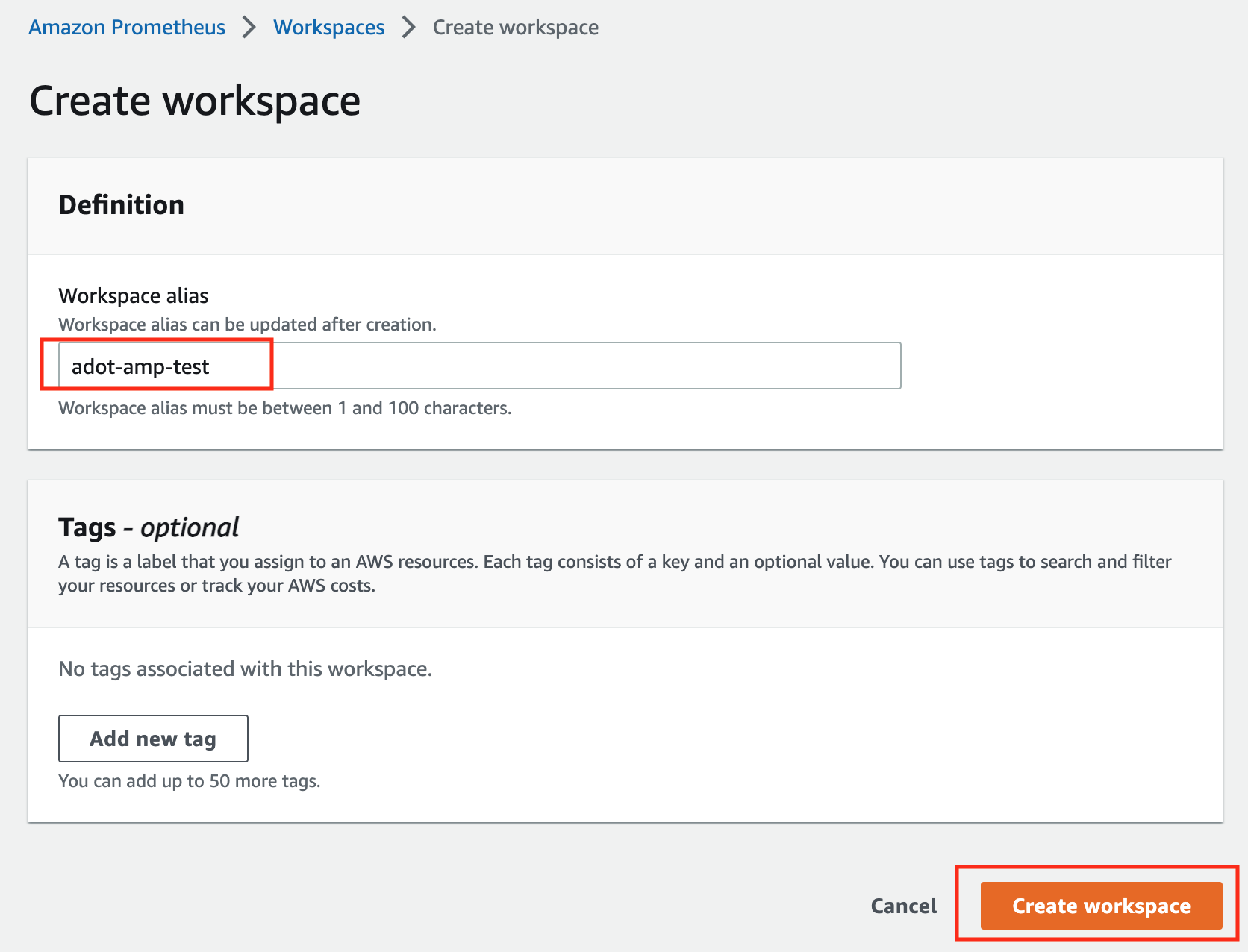
Type a workspace alias (adot-amp-test as an example), and click on Create workspace.
-
Make notes of the URLs displayed for Endpoint - remote write URL and Endpoint - query URL. You’ll need them when you configure your ADOT package to remote write metrics to this workspace and when you query metrics from this workspace. Make sure the workspace’s Status shows Active before proceeding to the next step.
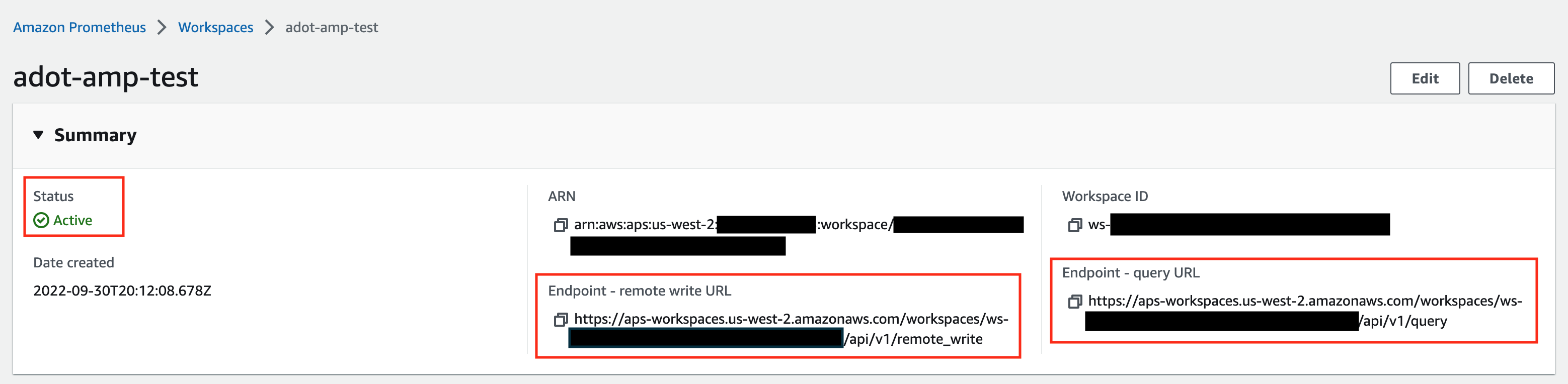
For additional options (i.e. through CLI) and configurations (i.e. add a tag) to create an AMP workspace, refer to AWS AMP create a workspace guide.
Setup IRSA for ADOT
If you haven’t already configured IRSA for your cluster, follow the EKS Anywhere cluster spec for Pod IAM
guide. This one-time setup includes creating an OIDC provider, configuring your cluster, generating keys, and deploying the pod-identity-webhook.
After IRSA infrastructure is configured, create an IAM role for ADOT. Replace <ACCOUNT_ID>, <ISSUER_HOSTPATH> with your values:
-
Create an IAM role with a trust policy that allows the ADOT ServiceAccount to assume it:
{
    "Version": "2012-10-17",
    "Statement": [
        {
            "Effect": "Allow",
            "Principal": {
                "Federated": "arn:aws:iam::<ACCOUNT_ID>:oidc-provider/<ISSUER_HOSTPATH>"
            },
            "Action": "sts:AssumeRoleWithWebIdentity",
            "Condition": {
                "StringEquals": {
                    "<ISSUER_HOSTPATH>:sub": "system:serviceaccount:observability:adot-collector",
                    "<ISSUER_HOSTPATH>:aud": "sts.amazonaws.com"
                }
            }
        }
    ]
}
-
Attach an IAM policy with proper AMP access to the IAM role. Below is an example that gives full access to AMP actions and resources. Refer to AMP IAM permissions and policies guide
for more customized options.
{
    "Version": "2012-10-17",
    "Statement": [
        {
            "Action": [
                "aps:*"
            ],
            "Effect": "Allow",
            "Resource": "*"
        }
    ]
}
-
Save the IAM role ARN (e.g., arn:aws:iam::123456789012:role/adot-amp-role). You’ll use this in the ADOT package configuration below.
Install the ADOT package
The ADOT package will be configured with three main components:
-
Prometheus Receiver: Designed to be a drop-in replacement for a Prometheus Server, capable of scraping metrics from microservices instrumented with the Prometheus client library
-
Prometheus Remote Write Exporter: Sends metrics to AMP for long-term storage using the remote write protocol
-
Sigv4 Authentication Extension: Enables ADOT pods to authenticate to AWS services using the IAM role configured via IRSA
The ADOT package can be configured using presets for automatic collector and RBAC setup, explicit rules and config, or both combined.
Using Presets
This approach uses the ADOT helm chart’s preset feature to automatically configure collectors and RBAC permissions.
-
Create an ADOT package configuration file named adot-package.yaml. Review comments carefully and replace everything wrapped with <> tags.
Click to expand ADOT package config with presets
apiVersion: packages.eks.amazonaws.com/v1alpha1
kind: Package
metadata:
  name: my-adot
  namespace: eksa-packages
spec:
  packageName: adot
  targetNamespace: observability
  config: |
    mode: deployment

    serviceAccount:
      create: true
      annotations:
        eks.amazonaws.com/role-arn: "<IAM-ROLE-ARN>"
      name: "adot-collector"

    presets:
      kubernetesAttributes:
        enabled: true
      kubeletMetrics:
        enabled: true

    clusterRole:
      create: true

    config:
      extensions:
        sigv4auth:
          region: "us-west-2"
          service: "aps"
          assume_role:
            sts_region: "us-west-2"

      receivers:
        prometheus:
          config:
            global:
              scrape_interval: 15s
              scrape_timeout: 10s
            scrape_configs:
            - job_name: kubernetes-apiservers
              bearer_token_file: /var/run/secrets/kubernetes.io/serviceaccount/token
              kubernetes_sd_configs:
              - role: endpoints
              relabel_configs:
              - action: keep
                regex: default;kubernetes;https
                source_labels:
                - __meta_kubernetes_namespace
                - __meta_kubernetes_service_name
                - __meta_kubernetes_endpoint_port_name
              scheme: https
              tls_config:
                ca_file: /var/run/secrets/kubernetes.io/serviceaccount/ca.crt
                insecure_skip_verify: false
            - job_name: kubernetes-nodes
              bearer_token_file: /var/run/secrets/kubernetes.io/serviceaccount/token
              kubernetes_sd_configs:
              - role: node
              relabel_configs:
              - action: labelmap
                regex: __meta_kubernetes_node_label_(.+)
              - replacement: kubernetes.default.svc:443
                target_label: __address__
              - regex: (.+)
                replacement: /api/v1/nodes/$$1/proxy/metrics
                source_labels:
                - __meta_kubernetes_node_name
                target_label: __metrics_path__
              scheme: https
              tls_config:
                ca_file: /var/run/secrets/kubernetes.io/serviceaccount/ca.crt
                insecure_skip_verify: false
            - job_name: kubernetes-service-endpoints
              kubernetes_sd_configs:
              - role: endpoints
              relabel_configs:
              - action: keep
                regex: true
                source_labels:
                - __meta_kubernetes_service_annotation_prometheus_io_scrape
              - action: replace
                regex: (https?)
                source_labels:
                - __meta_kubernetes_service_annotation_prometheus_io_scheme
                target_label: __scheme__
              - action: replace
                regex: (.+)
                source_labels:
                - __meta_kubernetes_service_annotation_prometheus_io_path
                target_label: __metrics_path__
              - action: replace
                regex: ([^:]+)(?::\d+)?;(\d+)
                replacement: $$1:$$2
                source_labels:
                - __address__
                - __meta_kubernetes_service_annotation_prometheus_io_port
                target_label: __address__
              - action: labelmap
                regex: __meta_kubernetes_service_label_(.+)
              - action: replace
                source_labels:
                - __meta_kubernetes_namespace
                target_label: kubernetes_namespace
              - action: replace
                source_labels:
                - __meta_kubernetes_service_name
                target_label: kubernetes_name

      processors:
        batch/metrics:
          timeout: 60s

      exporters:
        debug:
          verbosity: detailed
        prometheusremotewrite:
          endpoint: "<AMP-WORKSPACE-ENDPOINT>/api/v1/remote_write"  # Replace with your AMP workspace remote write endpoint
          auth:
            authenticator: sigv4auth

      service:
        extensions:
          - health_check
          - sigv4auth
        pipelines:
          metrics:
            receivers: [prometheus]
            processors: [batch/metrics]
            exporters: [debug, prometheusremotewrite]
-
Install the ADOT package using the configuration file:
eksctl anywhere create packages -f adot-package.yaml
Using Explicit RBAC Rules
For custom configurations, you can explicitly define ClusterRole rules in your package configuration.
-
Create an ADOT package configuration file named adot-package.yaml with explicit RBAC rules. Review comments carefully and replace everything wrapped with <> tags.
Click to expand ADOT package config with explicit rules
apiVersion: packages.eks.amazonaws.com/v1alpha1
kind: Package
metadata:
  name: my-adot
  namespace: eksa-packages
spec:
  packageName: adot
  targetNamespace: observability
  config: |
    mode: deployment

    serviceAccount:
      create: true
      annotations:
        eks.amazonaws.com/role-arn: "<IAM-ROLE-ARN>"
      name: "adot-collector"

    clusterRole:
      create: true
      rules:
        - apiGroups: [""]
          resources:
            - nodes
            - nodes/proxy
            - services
            - endpoints
            - pods
          verbs: ["get", "list", "watch"]
        - apiGroups: ["extensions"]
          resources:
            - ingresses
          verbs: ["get", "list", "watch"]
        - apiGroups: ["discovery.k8s.io"]
          resources:
            - endpointslices
          verbs: ["get", "list", "watch"]
        - nonResourceURLs:
            - /metrics
          verbs: ["get"]

    config:
      extensions:
        sigv4auth:
          region: "us-west-2"
          service: "aps"
          assume_role:
            sts_region: "us-west-2"

      receivers:
        prometheus:
          config:
            global:
              scrape_interval: 15s
              scrape_timeout: 10s
            scrape_configs:
            - job_name: kubernetes-apiservers
              bearer_token_file: /var/run/secrets/kubernetes.io/serviceaccount/token
              kubernetes_sd_configs:
              - role: endpoints
              relabel_configs:
              - action: keep
                regex: default;kubernetes;https
                source_labels:
                - __meta_kubernetes_namespace
                - __meta_kubernetes_service_name
                - __meta_kubernetes_endpoint_port_name
              scheme: https
              tls_config:
                ca_file: /var/run/secrets/kubernetes.io/serviceaccount/ca.crt
                insecure_skip_verify: false
            - job_name: kubernetes-nodes
              bearer_token_file: /var/run/secrets/kubernetes.io/serviceaccount/token
              kubernetes_sd_configs:
              - role: node
              relabel_configs:
              - action: labelmap
                regex: __meta_kubernetes_node_label_(.+)
              - replacement: kubernetes.default.svc:443
                target_label: __address__
              - regex: (.+)
                replacement: /api/v1/nodes/$$1/proxy/metrics
                source_labels:
                - __meta_kubernetes_node_name
                target_label: __metrics_path__
              scheme: https
              tls_config:
                ca_file: /var/run/secrets/kubernetes.io/serviceaccount/ca.crt
                insecure_skip_verify: false
            - job_name: kubernetes-nodes-cadvisor
              bearer_token_file: /var/run/secrets/kubernetes.io/serviceaccount/token
              kubernetes_sd_configs:
              - role: node
              relabel_configs:
              - action: labelmap
                regex: __meta_kubernetes_node_label_(.+)
              - replacement: kubernetes.default.svc:443
                target_label: __address__
              - regex: (.+)
                replacement: /api/v1/nodes/$$1/proxy/metrics/cadvisor
                source_labels:
                - __meta_kubernetes_node_name
                target_label: __metrics_path__
              scheme: https
              tls_config:
                ca_file: /var/run/secrets/kubernetes.io/serviceaccount/ca.crt
                insecure_skip_verify: false
            - job_name: kubernetes-service-endpoints
              kubernetes_sd_configs:
              - role: endpoints
              relabel_configs:
              - action: keep
                regex: true
                source_labels:
                - __meta_kubernetes_service_annotation_prometheus_io_scrape
              - action: replace
                regex: (https?)
                source_labels:
                - __meta_kubernetes_service_annotation_prometheus_io_scheme
                target_label: __scheme__
              - action: replace
                regex: (.+)
                source_labels:
                - __meta_kubernetes_service_annotation_prometheus_io_path
                target_label: __metrics_path__
              - action: replace
                regex: ([^:]+)(?::\d+)?;(\d+)
                replacement: $$1:$$2
                source_labels:
                - __address__
                - __meta_kubernetes_service_annotation_prometheus_io_port
                target_label: __address__
              - action: labelmap
                regex: __meta_kubernetes_service_annotation_prometheus_io_param_(.+)
                replacement: __param_$$1
              - action: labelmap
                regex: __meta_kubernetes_service_label_(.+)
              - action: replace
                source_labels:
                - __meta_kubernetes_namespace
                target_label: kubernetes_namespace
              - action: replace
                source_labels:
                - __meta_kubernetes_service_name
                target_label: kubernetes_name
              - action: replace
                source_labels:
                - __meta_kubernetes_pod_node_name
                target_label: kubernetes_node
            - job_name: kubernetes-service-endpoints-slow
              kubernetes_sd_configs:
              - role: endpoints
              relabel_configs:
              - action: keep
                regex: true
                source_labels:
                - __meta_kubernetes_service_annotation_prometheus_io_scrape_slow
              - action: replace
                regex: (https?)
                source_labels:
                - __meta_kubernetes_service_annotation_prometheus_io_scheme
                target_label: __scheme__
              - action: replace
                regex: (.+)
                source_labels:
                - __meta_kubernetes_service_annotation_prometheus_io_path
                target_label: __metrics_path__
              - action: replace
                regex: ([^:]+)(?::\d+)?;(\d+)
                replacement: $$1:$$2
                source_labels:
                - __address__
                - __meta_kubernetes_service_annotation_prometheus_io_port
                target_label: __address__
              - action: labelmap
                regex: __meta_kubernetes_service_annotation_prometheus_io_param_(.+)
                replacement: __param_$$1
              - action: labelmap
                regex: __meta_kubernetes_service_label_(.+)
              - action: replace
                source_labels:
                - __meta_kubernetes_namespace
                target_label: kubernetes_namespace
              - action: replace
                source_labels:
                - __meta_kubernetes_service_name
                target_label: kubernetes_name
              - action: replace
                source_labels:
                - __meta_kubernetes_pod_node_name
                target_label: kubernetes_node
              scrape_interval: 5m
              scrape_timeout: 30s
            - job_name: prometheus-pushgateway
              kubernetes_sd_configs:
              - role: service
              relabel_configs:
              - action: keep
                regex: pushgateway
                source_labels:
                - __meta_kubernetes_service_annotation_prometheus_io_probe
            - job_name: kubernetes-services
              kubernetes_sd_configs:
              - role: service
              metrics_path: /probe
              params:
                module:
                - http_2xx
              relabel_configs:
              - action: keep
                regex: true
                source_labels:
                - __meta_kubernetes_service_annotation_prometheus_io_probe
              - source_labels:
                - __address__
                target_label: __param_target
              - replacement: blackbox
                target_label: __address__
              - source_labels:
                - __param_target
                target_label: instance
              - action: labelmap
                regex: __meta_kubernetes_service_label_(.+)
              - source_labels:
                - __meta_kubernetes_namespace
                target_label: kubernetes_namespace
              - source_labels:
                - __meta_kubernetes_service_name
                target_label: kubernetes_name
            - job_name: kubernetes-pods
              kubernetes_sd_configs:
              - role: pod
              relabel_configs:
              - action: keep
                regex: true
                source_labels:
                - __meta_kubernetes_pod_annotation_prometheus_io_scrape
              - action: replace
                regex: (https?)
                source_labels:
                - __meta_kubernetes_pod_annotation_prometheus_io_scheme
                target_label: __scheme__
              - action: replace
                regex: (.+)
                source_labels:
                - __meta_kubernetes_pod_annotation_prometheus_io_path
                target_label: __metrics_path__
              - action: replace
                regex: ([^:]+)(?::\d+)?;(\d+)
                replacement: $$1:$$2
                source_labels:
                - __address__
                - __meta_kubernetes_pod_annotation_prometheus_io_port
                target_label: __address__
              - action: labelmap
                regex: __meta_kubernetes_pod_annotation_prometheus_io_param_(.+)
                replacement: __param_$$1
              - action: labelmap
                regex: __meta_kubernetes_pod_label_(.+)
              - action: replace
                source_labels:
                - __meta_kubernetes_namespace
                target_label: kubernetes_namespace
              - action: replace
                source_labels:
                - __meta_kubernetes_pod_name
                target_label: kubernetes_pod_name
              - action: drop
                regex: Pending|Succeeded|Failed|Completed
                source_labels:
                - __meta_kubernetes_pod_phase
            - job_name: kubernetes-pods-slow
              scrape_interval: 5m
              scrape_timeout: 30s
              kubernetes_sd_configs:
              - role: pod
              relabel_configs:
              - action: keep
                regex: true
                source_labels:
                - __meta_kubernetes_pod_annotation_prometheus_io_scrape_slow
              - action: replace
                regex: (https?)
                source_labels:
                - __meta_kubernetes_pod_annotation_prometheus_io_scheme
                target_label: __scheme__
              - action: replace
                regex: (.+)
                source_labels:
                - __meta_kubernetes_pod_annotation_prometheus_io_path
                target_label: __metrics_path__
              - action: replace
                regex: ([^:]+)(?::\d+)?;(\d+)
                replacement: $$1:$$2
                source_labels:
                - __address__
                - __meta_kubernetes_pod_annotation_prometheus_io_port
                target_label: __address__
              - action: labelmap
                regex: __meta_kubernetes_pod_annotation_prometheus_io_param_(.+)
                replacement: __param_$1
              - action: labelmap
                regex: __meta_kubernetes_pod_label_(.+)
              - action: replace
                source_labels:
                - __meta_kubernetes_namespace
                target_label: namespace
              - action: replace
                source_labels:
                - __meta_kubernetes_pod_name
                target_label: pod
              - action: drop
                regex: Pending|Succeeded|Failed|Completed
                source_labels:
                - __meta_kubernetes_pod_phase

      processors:
        batch/metrics:
          timeout: 60s

      exporters:
        debug:
          verbosity: detailed
        prometheusremotewrite:
          endpoint: "<AMP-WORKSPACE-ENDPOINT>/api/v1/remote_write"  # Replace with your AMP workspace remote write endpoint
          auth:
            authenticator: sigv4auth

      service:
        extensions:
          - health_check
          - sigv4auth
        pipelines:
          metrics:
            receivers: [prometheus]
            processors: [batch/metrics]
            exporters: [debug, prometheusremotewrite]
-
Install the ADOT package:
eksctl anywhere create packages -f adot-package.yaml
Available Presets
The ADOT helm chart provides several presets that automatically configure both collector features and RBAC permissions:
| Preset |
Description |
Auto-Added RBAC Rules |
kubernetesAttributes |
Adds Kubernetes metadata (pod, namespace, etc.) to metrics |
pods, namespaces, replicasets (apps & extensions) |
kubeletMetrics |
Collects metrics from kubelet |
nodes/stats |
clusterMetrics |
Collects cluster-level metrics |
events, namespaces, nodes, pods, services, daemonsets, deployments, replicasets, statefulsets, jobs, cronjobs, horizontalpodautoscalers |
kubernetesEvents |
Collects Kubernetes events |
events (events.k8s.io apiGroup) |
logsCollection |
Collects logs from nodes (best with daemonset mode) |
None (requires host access) |
hostMetrics |
Collects host-level metrics (best with daemonset mode) |
None (requires host access) |
For more details on presets, refer to the OpenTelemetry Collector Kubernetes Components documentation
.
ADOT Package Test
To ensure the ADOT package is installed correctly in the cluster, perform the following tests:
Check pod logs
Check ADOT pod logs using kubectl logs <adot-pod-name> -n <namespace>. It should display logs similar to below.
...
2022-09-30T23:22:59.184Z	info	service/telemetry.go:103	Setting up own telemetry...
2022-09-30T23:22:59.184Z	info	service/telemetry.go:138	Serving Prometheus metrics	{"address": "0.0.0.0:8888", "level": "basic"}
2022-09-30T23:22:59.185Z	info	components/components.go:30	In development component. May change in the future.	{"kind": "exporter", "data_type": "metrics", "name": "logging", "stability": "in development"}
2022-09-30T23:22:59.186Z	info	extensions/extensions.go:42	Starting extensions...
2022-09-30T23:22:59.186Z	info	extensions/extensions.go:45	Extension is starting...	{"kind": "extension", "name": "health_check"}
2022-09-30T23:22:59.186Z	info	healthcheckextension@v0.58.0/healthcheckextension.go:44	Starting health_check extension	{"kind": "extension", "name": "health_check", "config": {"Endpoint":"0.0.0.0:13133","TLSSetting":null,"CORS":null,"Auth":null,"MaxRequestBodySize":0,"IncludeMetadata":false,"Path":"/","CheckCollectorPipeline":{"Enabled":false,"Interval":"5m","ExporterFailureThreshold":5}}}
2022-09-30T23:22:59.186Z	info	extensions/extensions.go:49	Extension started.	{"kind": "extension", "name": "health_check"}
2022-09-30T23:22:59.186Z	info	extensions/extensions.go:45	Extension is starting...	{"kind": "extension", "name": "memory_ballast"}
2022-09-30T23:22:59.187Z	info	ballastextension/memory_ballast.go:52	Setting memory ballast	{"kind": "extension", "name": "memory_ballast", "MiBs": 0}
2022-09-30T23:22:59.187Z	info	extensions/extensions.go:49	Extension started.	{"kind": "extension", "name": "memory_ballast"}
2022-09-30T23:22:59.187Z	info	extensions/extensions.go:45	Extension is starting...	{"kind": "extension", "name": "sigv4auth"}
2022-09-30T23:22:59.187Z	info	extensions/extensions.go:49	Extension started.	{"kind": "extension", "name": "sigv4auth"}
2022-09-30T23:22:59.187Z	info	pipelines/pipelines.go:74	Starting exporters...
2022-09-30T23:22:59.187Z	info	pipelines/pipelines.go:78	Exporter is starting...	{"kind": "exporter", "data_type": "metrics", "name": "logging"}
2022-09-30T23:22:59.187Z	info	pipelines/pipelines.go:82	Exporter started.	{"kind": "exporter", "data_type": "metrics", "name": "logging"}
2022-09-30T23:22:59.187Z	info	pipelines/pipelines.go:78	Exporter is starting...	{"kind": "exporter", "data_type": "metrics", "name": "prometheusremotewrite"}
2022-09-30T23:22:59.187Z	info	pipelines/pipelines.go:82	Exporter started.	{"kind": "exporter", "data_type": "metrics", "name": "prometheusremotewrite"}
2022-09-30T23:22:59.187Z	info	pipelines/pipelines.go:86	Starting processors...
2022-09-30T23:22:59.187Z	info	pipelines/pipelines.go:90	Processor is starting...	{"kind": "processor", "name": "batch/metrics", "pipeline": "metrics"}
2022-09-30T23:22:59.187Z	info	pipelines/pipelines.go:94	Processor started.	{"kind": "processor", "name": "batch/metrics", "pipeline": "metrics"}
2022-09-30T23:22:59.187Z	info	pipelines/pipelines.go:98	Starting receivers...
2022-09-30T23:22:59.187Z	info	pipelines/pipelines.go:102	Receiver is starting...	{"kind": "receiver", "name": "prometheus", "pipeline": "metrics"}
2022-09-30T23:22:59.187Z	info	kubernetes/kubernetes.go:326	Using pod service account via in-cluster config	{"kind": "receiver", "name": "prometheus", "pipeline": "metrics", "discovery": "kubernetes"}
2022-09-30T23:22:59.188Z	info	kubernetes/kubernetes.go:326	Using pod service account via in-cluster config	{"kind": "receiver", "name": "prometheus", "pipeline": "metrics", "discovery": "kubernetes"}
2022-09-30T23:22:59.188Z	info	kubernetes/kubernetes.go:326	Using pod service account via in-cluster config	{"kind": "receiver", "name": "prometheus", "pipeline": "metrics", "discovery": "kubernetes"}
2022-09-30T23:22:59.188Z	info	kubernetes/kubernetes.go:326	Using pod service account via in-cluster config	{"kind": "receiver", "name": "prometheus", "pipeline": "metrics", "discovery": "kubernetes"}
2022-09-30T23:22:59.189Z	info	pipelines/pipelines.go:106	Receiver started.	{"kind": "receiver", "name": "prometheus", "pipeline": "metrics"}
2022-09-30T23:22:59.189Z	info	healthcheck/handler.go:129	Health Check state change	{"kind": "extension", "name": "health_check", "status": "ready"}
2022-09-30T23:22:59.189Z	info	service/collector.go:215	Starting aws-otel-collector...	{"Version": "v0.21.1", "NumCPU": 2}
2022-09-30T23:22:59.189Z	info	service/collector.go:128	Everything is ready. Begin running and processing data.
...
Check AMP endpoint using awscurl
Use awscurl commands below to check if AMP received the metrics data sent by ADOT. The awscurl tool is a curl like tool with AWS Signature Version 4 request signing. The command below should return a status code success.
pip install awscurl
awscurl -X POST --region us-west-2 --service aps "<amp-query-endpoint>?query=up"
Create an AMG workspace and connect to the AMP workspace
An AMG workspace is created to query metrics from the AMP workspace and visualize the metrics in user-selected or user-built dashboards.
Follow steps below to create the AMG workspace:
-
Enable AWS Single-Sign-on (AWS SSO). Refer to IAM Identity Center
for details.
-
Open the Amazon Managed Grafana console at https://console.aws.amazon.com/grafana/.
-
Choose Create workspace.
-
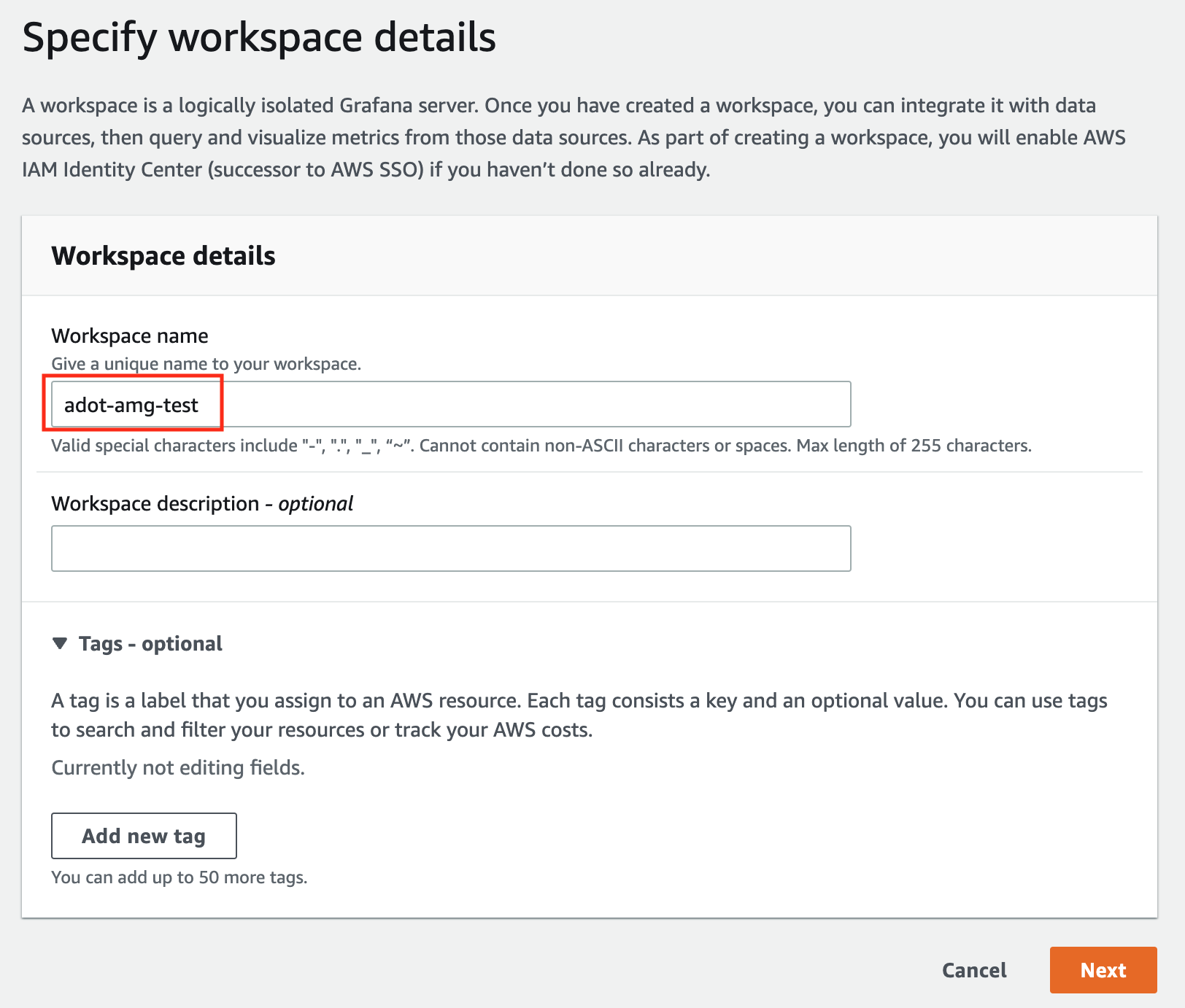
In the Workspace details window, for Workspace name, enter a name for the workspace.
-
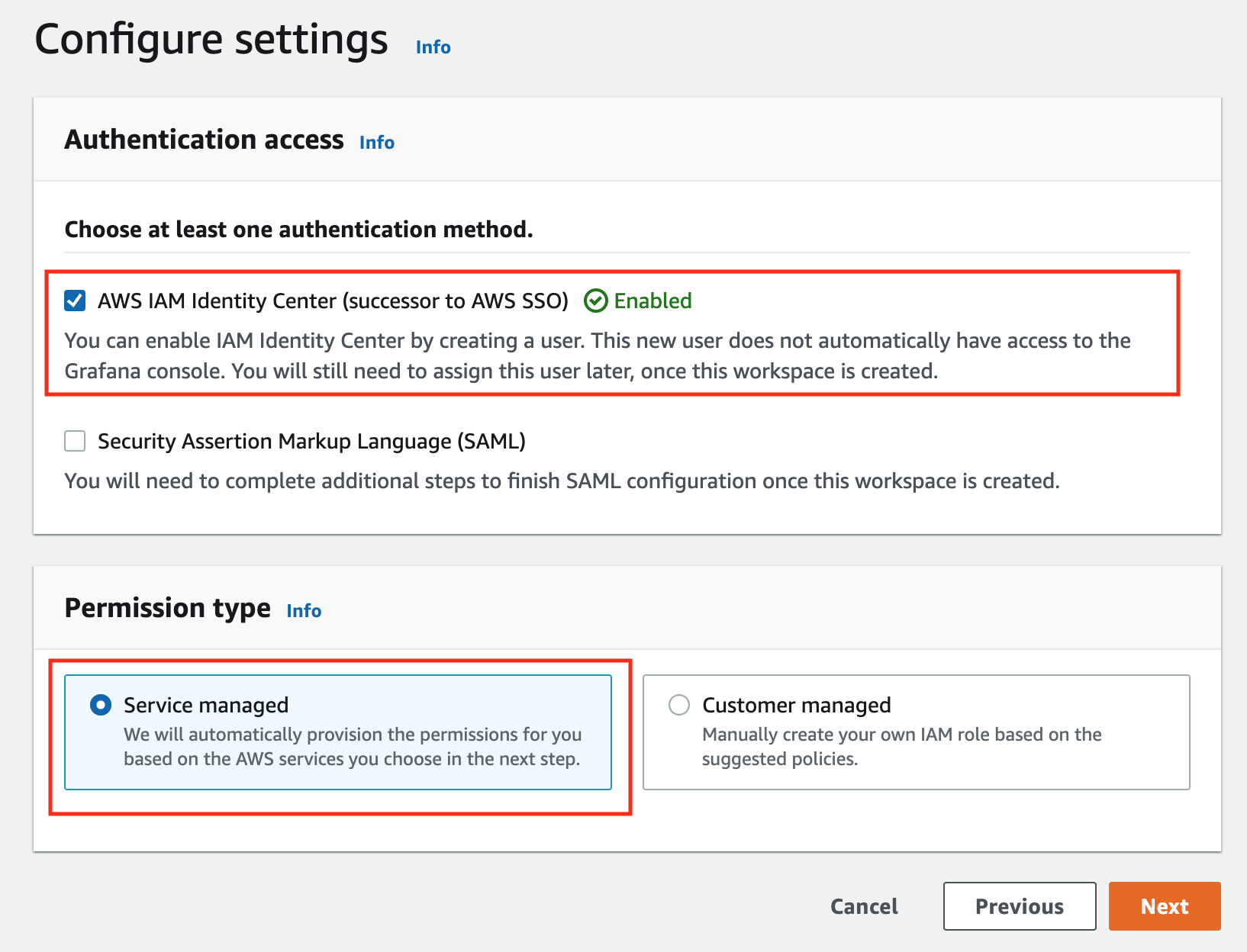
In the config settings window, choose Authentication access by AWS IAM Identity Center, and Permission type of Service managed.
-
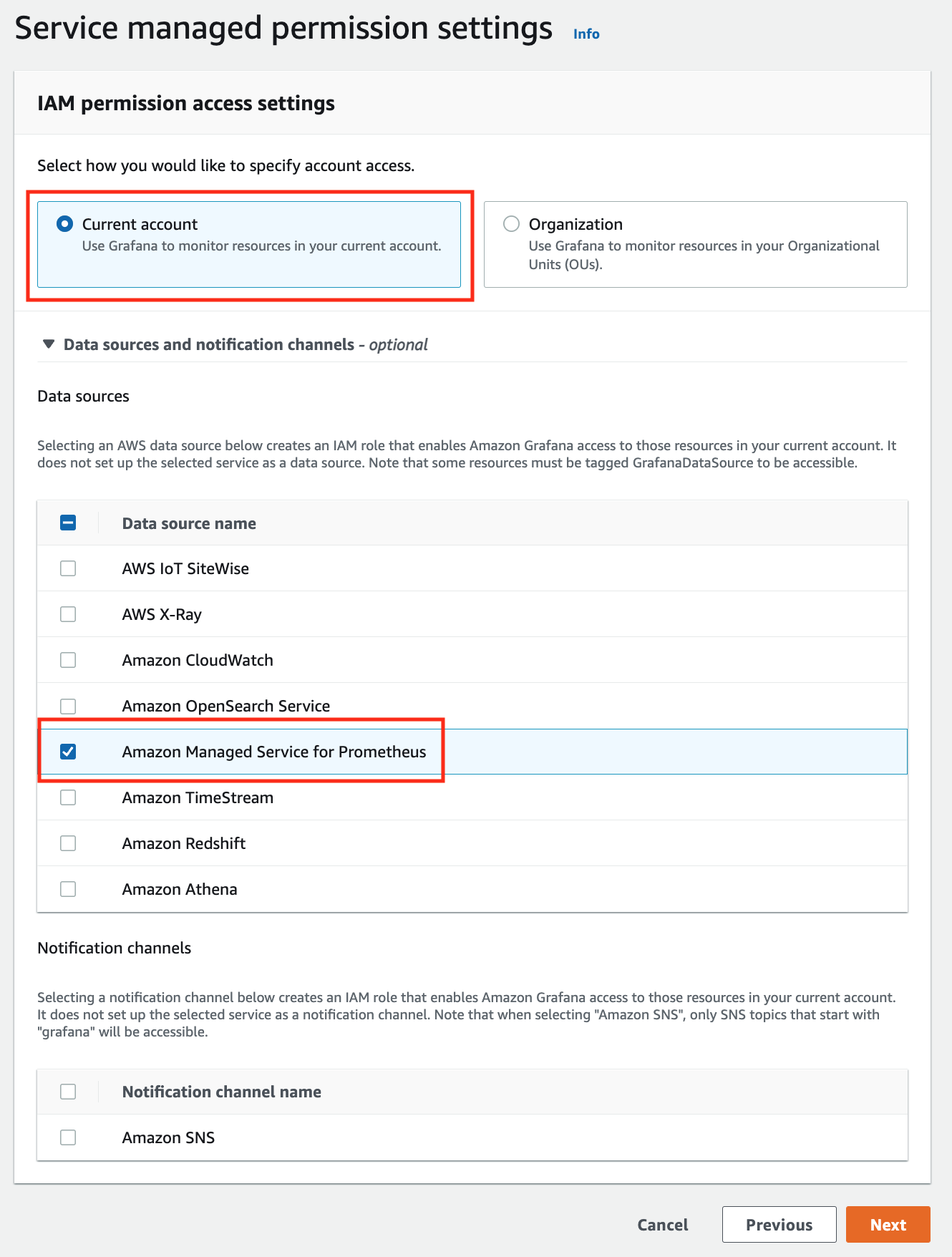
In the IAM permission access setting window, choose Current account access, and Amazon Managed Service for Prometheus as data source.
-
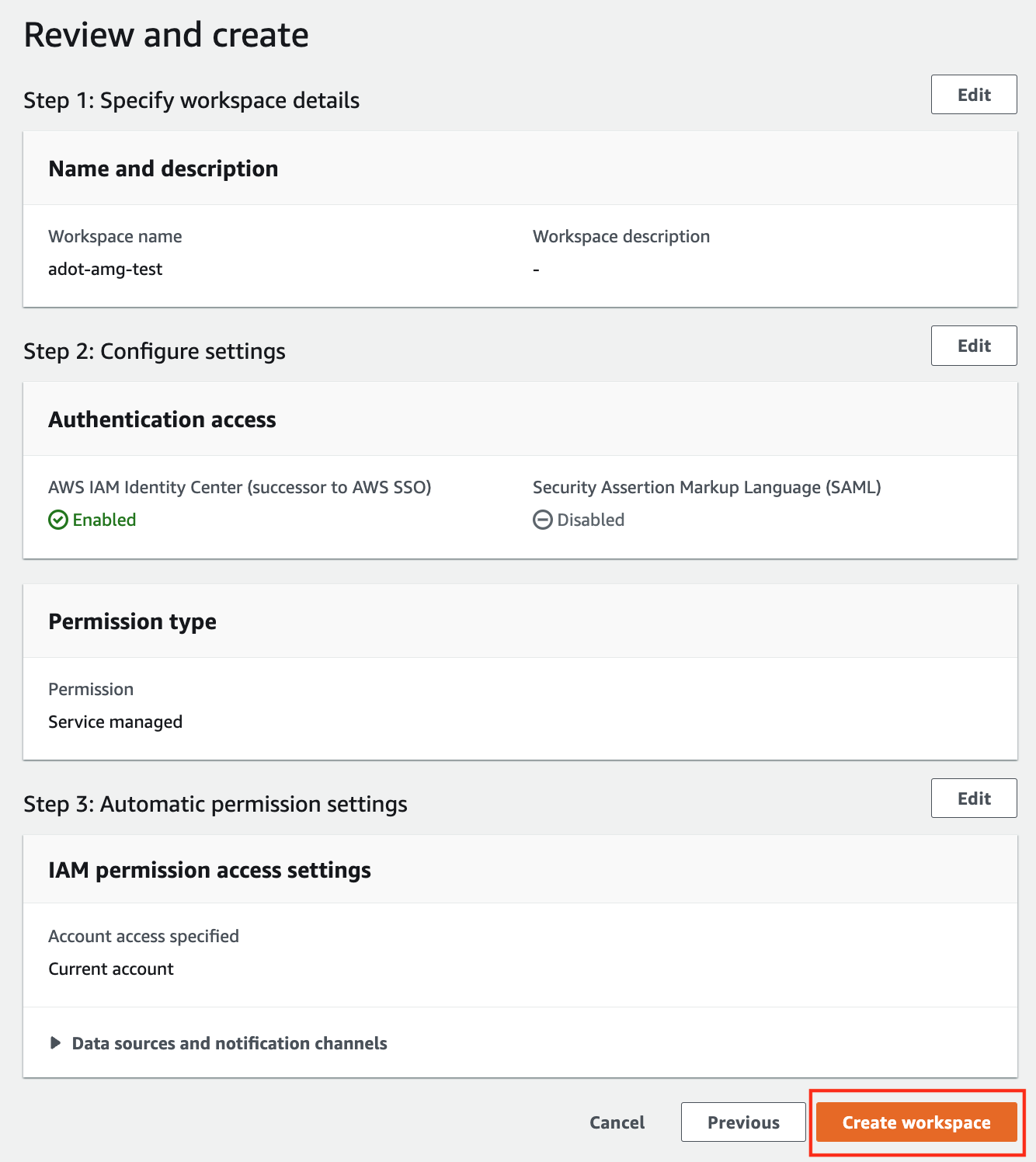
Review all settings and click on Create workspace.
-
Once the workspace shows a Status of Active, you can access it by clicking the Grafana workspace URL. Click on Sign in with AWS IAM Identity Center to finish the authentication.
Follow steps below to add the AMP workspace to AMG:
-
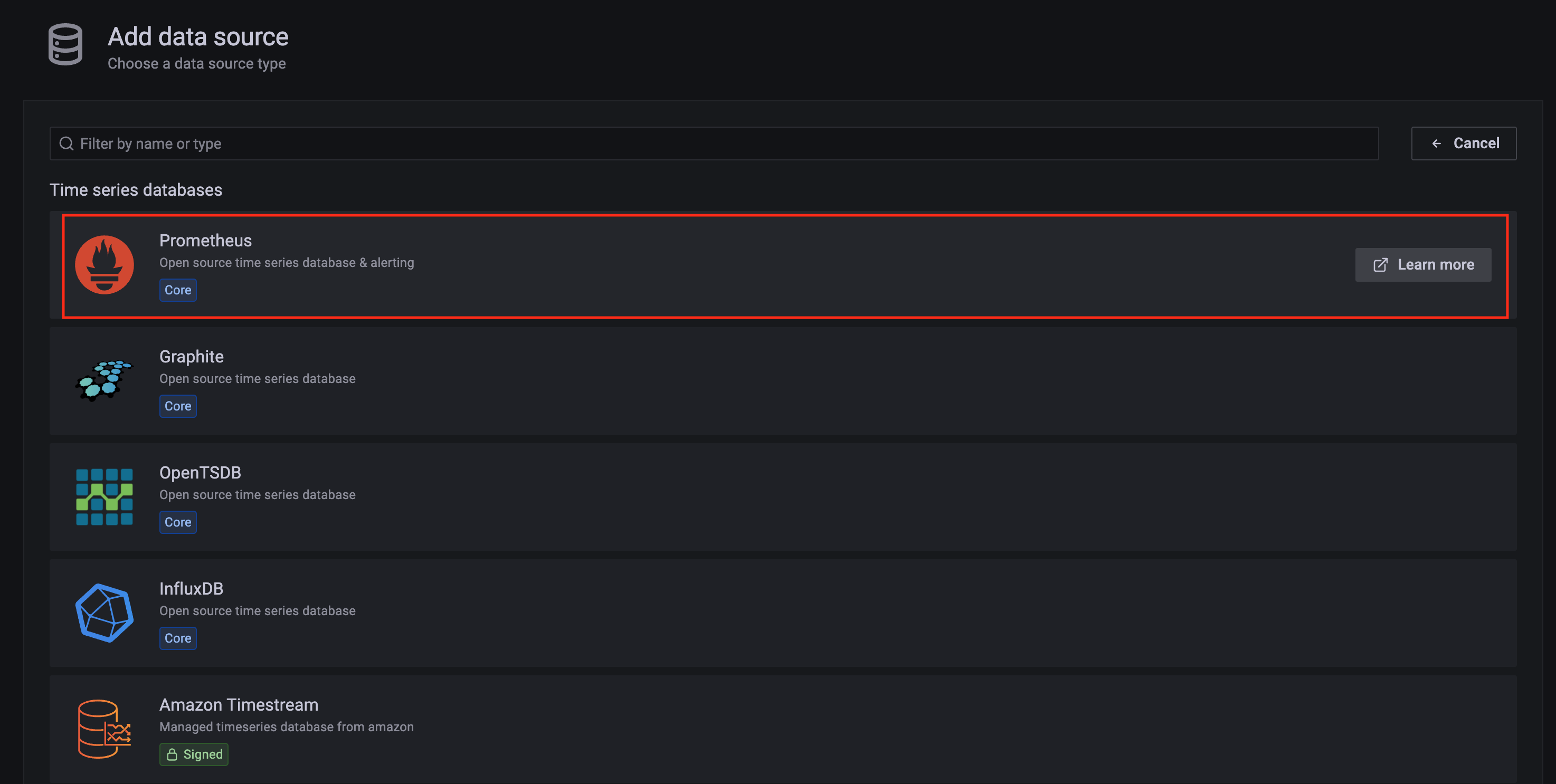
Click on the config sign on the left navigation bar, select Data sources, then choose Prometheus as the Data source.
-
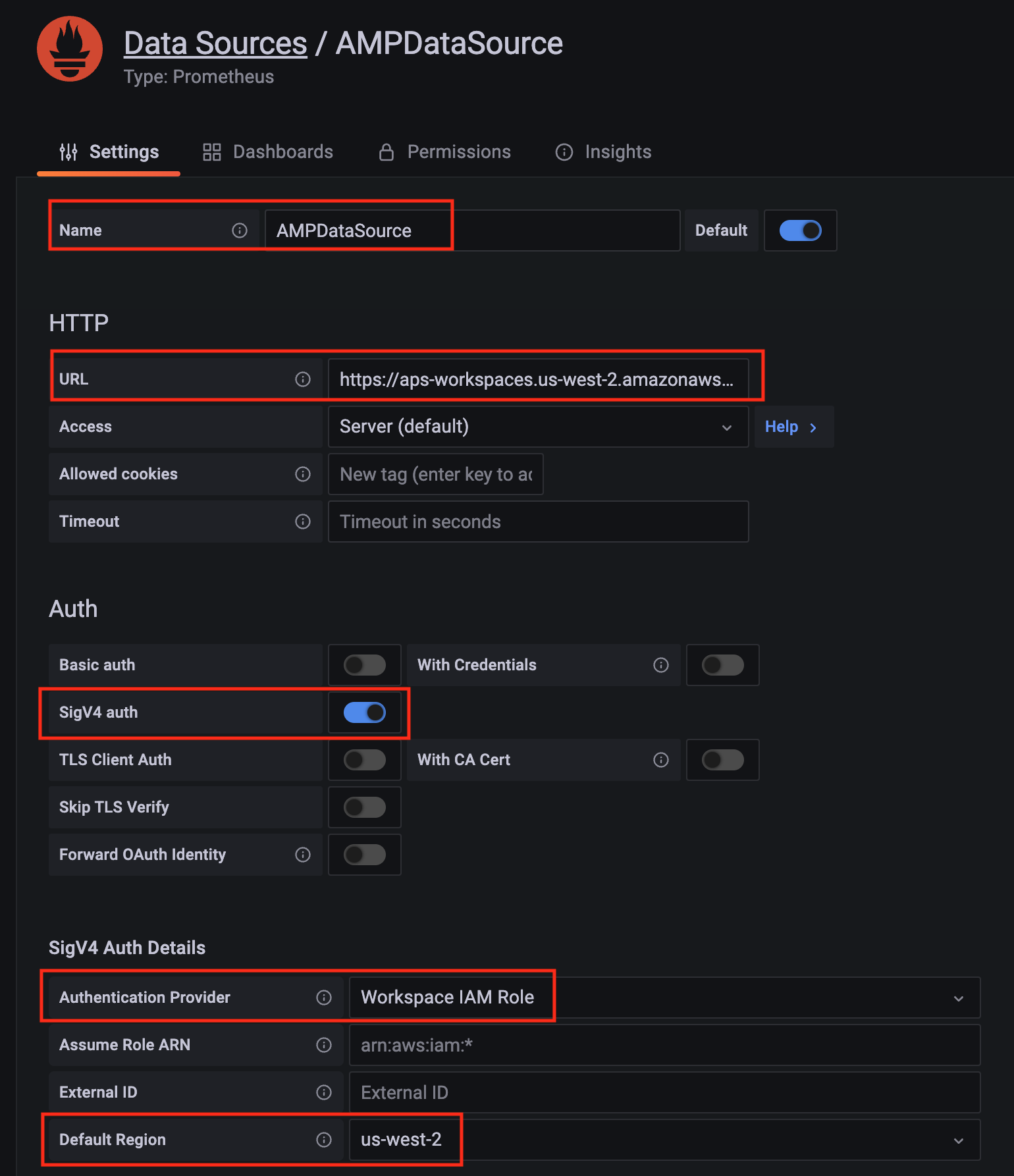
Configure Prometheus data source with the following details:
- Name:
AMPDataSource as an example.
- URL: add the AMP workspace remote write URL without the
api/v1/remote_write at the end.
- SigV4 auth: enable.
- Under the SigV4 Auth Details section:
- Authentication Provider: choose
Workspace IAM Role;
- Default Region: choose
us-west-2 (where you created the AMP workspace)
- Select the
Save and test, and a notification data source is working should be displayed.
-
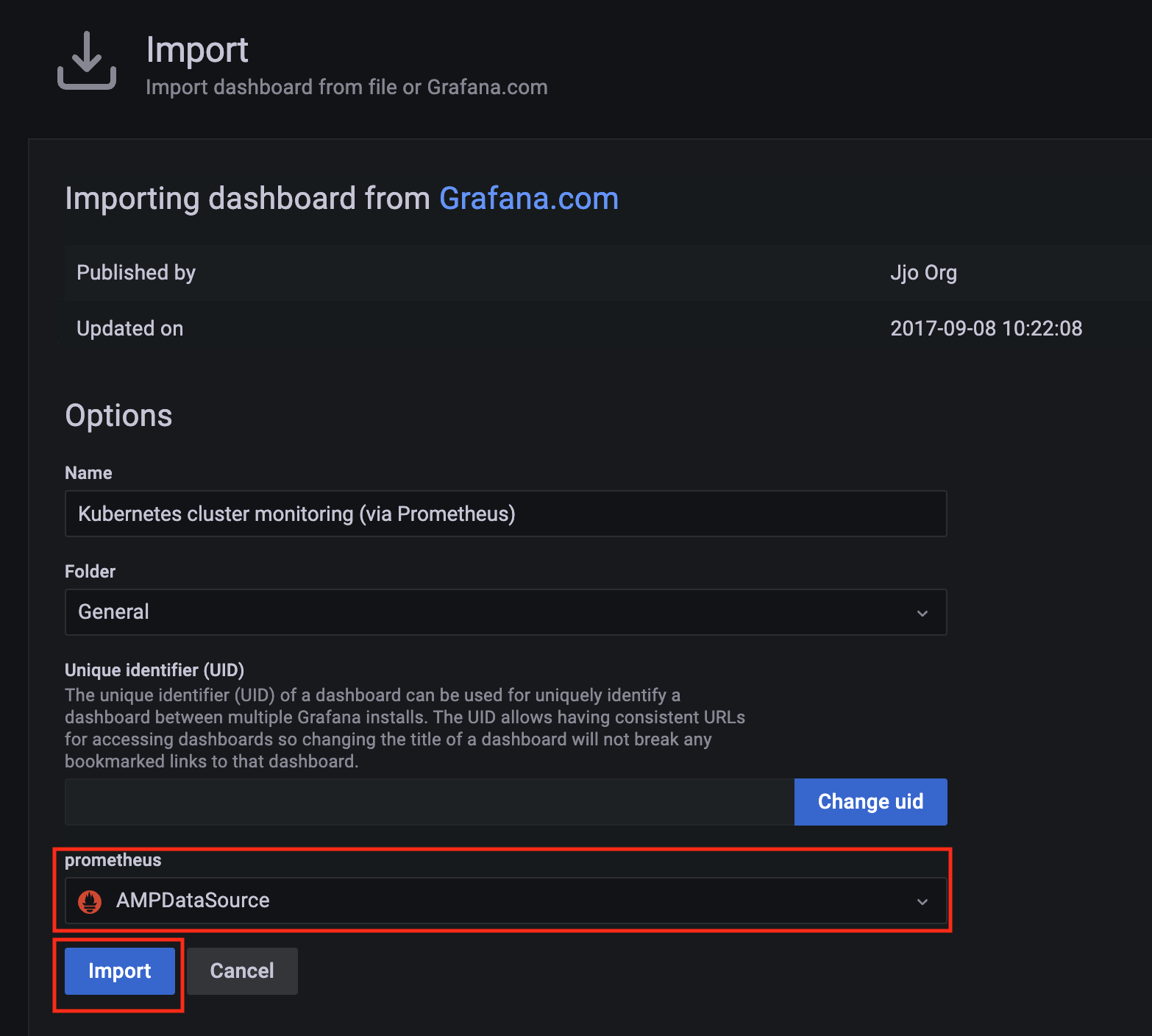
Import a dashboard template by clicking on the plus (+) sign on the left navigation bar. In the Import screen, type 3119 in the Import via grafana.com textbox and select Import.
From the dropdown at the bottom, select AMPDataSource and select Import.
-
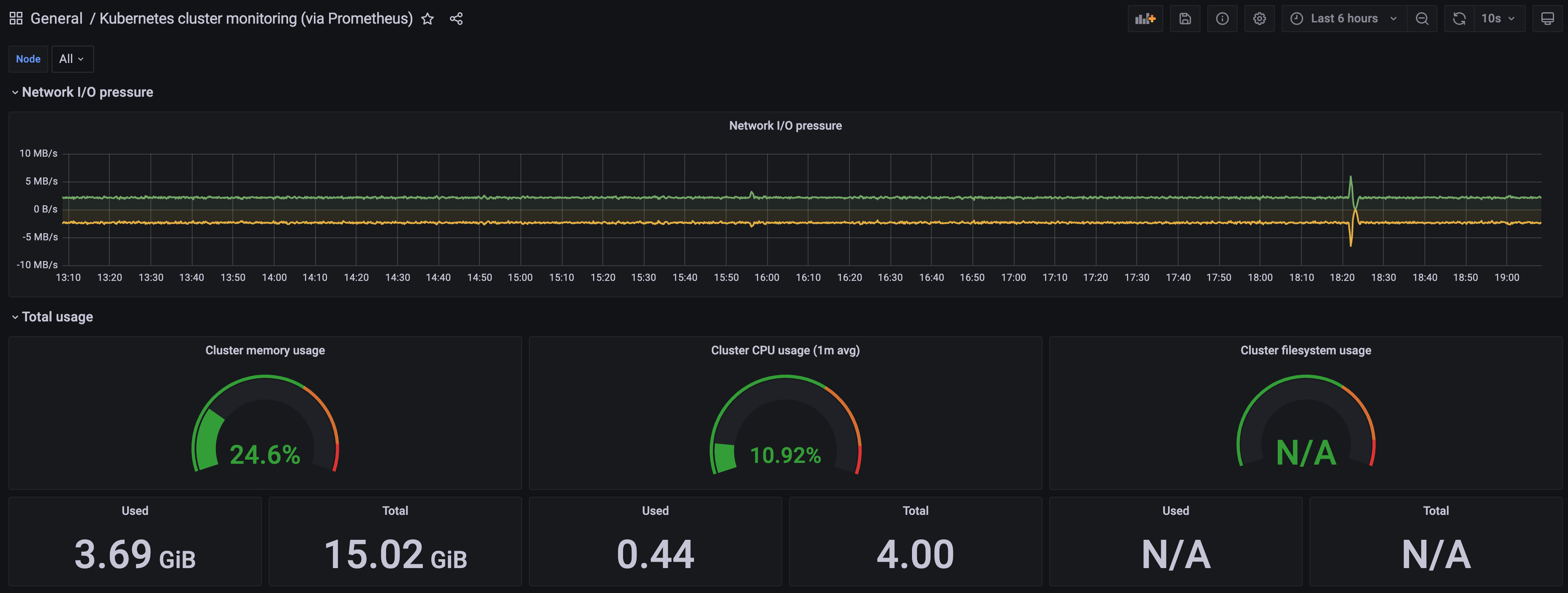
A Kubernetes cluster monitoring (via Prometheus) dashboard will be displayed.
2 - AWS Distro for OpenTelemetry (ADOT)
Install/upgrade/uninstall ADOT
If you have not already done so, make sure your cluster meets the package prerequisites.
Be sure to refer to the troubleshooting guide
in the event of a problem.
Important
- Starting at
eksctl anywhere version v0.12.0, packages on workload clusters are remotely managed by the management cluster.
- While following this guide to install packages on a workload cluster, please make sure the
kubeconfig is pointing to the management cluster that was used to create the workload cluster. The only exception is the kubectl create namespace command below, which should be run with kubeconfig pointing to the workload cluster.
Install
-
Generate the package configuration
eksctl anywhere generate package adot --cluster <cluster-name> > adot.yaml
-
Add the desired configuration to adot.yaml
Please see complete configuration options
for all configuration options and their default values.
Example package file with daemonSet mode and default configuration:
 apiVersion: packages.eks.amazonaws.com/v1alpha1
 kind: Package
 metadata:
   name: my-adot
   namespace: eksa-packages-<cluster-name>
 spec:
   packageName: adot
   targetNamespace: observability
   config: |
     mode: daemonset
Example package file with deployment mode and customized collector components to scrap
ADOT collector’s own metrics:
 apiVersion: packages.eks.amazonaws.com/v1alpha1
 kind: Package
 metadata:
   name: my-adot
   namespace: eksa-packages-<cluster-name>
 spec:
   packageName: adot
   targetNamespace: observability
   config: |
     mode: deployment
     replicaCount: 2
     config:
       receivers:
         prometheus:
           config:
             scrape_configs:
               - job_name: opentelemetry-collector
                 scrape_interval: 10s
                 static_configs:
                   - targets:
                       - ${MY_POD_IP}:8888
       processors:
         batch: {}
         memory_limiter: null
       exporters:
         logging:
           loglevel: debug
         prometheusremotewrite:
           endpoint: "<prometheus-remote-write-end-point>"
       extensions:
         health_check: {}
         memory_ballast: {}
       service:
         pipelines:
           metrics:
             receivers: [prometheus]
             processors: [batch]
             exporters: [logging, prometheusremotewrite]
         telemetry:
           metrics:
             address: 0.0.0.0:8888
-
Create the namespace
(If overriding targetNamespace, change observability to the value of targetNamespace)
kubectl create namespace observability
-
Install adot
eksctl anywhere create packages -f adot.yaml
-
Validate the installation
eksctl anywhere get packages --cluster <cluster-name>
Example command output
NAME   PACKAGE   AGE   STATE       CURRENTVERSION                                                            TARGETVERSION                                                                   DETAIL
my-adot   adot   19h   installed   0.25.0-c26690f90d38811dbb0e3dad5aea77d1efa52c7b   0.25.0-c26690f90d38811dbb0e3dad5aea77d1efa52c7b (latest)
Update
To update package configuration, update adot.yaml file, and run the following command:
eksctl anywhere apply package -f adot.yaml
Upgrade
ADOT will automatically be upgraded when a new bundle is activated.
Uninstall
To uninstall ADOT, simply delete the package
eksctl anywhere delete package --cluster <cluster-name> my-adot
3 - v0.21.1
Configuring ADOT in EKS Anywhere package spec
Example
We included a sample configuration below for reference. For in-depth examples and use cases, please refer to ADOT with AMP and AMG.
apiVersion: packages.eks.amazonaws.com/v1alpha1
kind: Package
metadata:
  name: my-adot
  namespace: eksa-packages-<cluster-name>
spec:
  packageName: adot
  targetNamespace: observability
  config: |
    mode: daemonset
Configurable parameters and default values under spec.config
| Parameter |
Description |
Default |
| General |
|
|
| hostNetwork |
Indicates if the pod should run in the host networking namespace. |
false |
| image.pullPolicy |
Specifies image pull policy: IfNotPresent, Always, Never. |
"IfNotPresent" |
| mode |
Specifies Collector deployment options: daemonset, deployment, or statefulset. |
"daemonset" |
| ports.[*].containerPort |
Specifies containerPort used. |
See footnote |
| ports.[*].enabled |
Indicates if a port is enabled. |
See footnote |
| ports.[*].hostPort |
Specifies hostPort used. |
See footnote |
| ports.[*].protocol |
Specifies protocol used. |
See footnote |
| ports.[*].servicePort |
Specifies servicePort used. |
See footnote |
| resources.limits.cpu |
Specifies CPU resource limits for containers. |
1 |
| resources.limits.memory |
Specifies memory resource limits for containers. |
"2Gi" |
| Config |
|
|
| config.config |
Specifies Collector receiver, processor, exporter, and extensions configurations. Refer to aws-otel-collector
for full details. Note EKS Anywhere ADOT package version matches the exact aws-otel-collector version. |
See footnote |
| config.config.receiver |
Specifies how data gets in the Collector. Receivers can be either push or pull based, and support one or more data source. |
See footnote |
| config.config.processor |
Specifies how processors are run on data between the stage of being received and being exported. Processors are optional though some are recommended.
|
See footnote |
| config.config.exporters |
Specifies how data gets sent to backends/destinations. Exporters can be either push or pull based, and support one or more data source. |
See footnote |
| config.config.extensions |
Specifies tasks that do not involve processing telemetry data. Examples of extensions include health monitoring, service discovery, and data forwarding. Extensions are optional. |
See footnote |
| config.config.service |
Specifies what components are enabled in the Collector based on the configuration found in the receivers, processors, exporters, and extensions sections. If a component is configured, but not defined within the service section, then it is not enabled. |
See footnote |
| Deployment mode only |
|
|
| replicaCount |
Specifies replicaCount for pods. |
1 |
| service.type |
Specifies service types: ClusterIP, NodePort, LoadBalancer, ExternalName. |
"ClusterIP" |
4 - v0.23.0
Configuring ADOT in EKS Anywhere package spec
Example
We included a sample configuration below for reference. For in-depth examples and use cases, please refer to ADOT with AMP and AMG.
apiVersion: packages.eks.amazonaws.com/v1alpha1
kind: Package
metadata:
  name: my-adot
  namespace: eksa-packages-<cluster-name>
spec:
  packageName: adot
  targetNamespace: observability
  config: |
    mode: daemonset
Configurable parameters and default values under spec.config
| Parameter |
Description |
Default |
| General |
|
|
| hostNetwork |
Indicates if the pod should run in the host networking namespace. |
false |
| image.pullPolicy |
Specifies image pull policy: IfNotPresent, Always, Never. |
"IfNotPresent" |
| mode |
Specifies Collector deployment options: daemonset, deployment, or statefulset. |
"daemonset" |
| ports.[*].containerPort |
Specifies containerPort used. |
See footnote |
| ports.[*].enabled |
Indicates if a port is enabled. |
See footnote |
| ports.[*].hostPort |
Specifies hostPort used. |
See footnote |
| ports.[*].protocol |
Specifies protocol used. |
See footnote |
| ports.[*].servicePort |
Specifies servicePort used. |
See footnote |
| resources.limits.cpu |
Specifies CPU resource limits for containers. |
1 |
| resources.limits.memory |
Specifies memory resource limits for containers. |
"2Gi" |
| Config |
|
|
| config.config |
Specifies Collector receiver, processor, exporter, and extensions configurations. Refer to aws-otel-collector
for full details. Note EKS Anywhere ADOT package version matches the exact aws-otel-collector version. |
See footnote |
| config.config.receiver |
Specifies how data gets in the Collector. Receivers can be either push or pull based, and support one or more data source. |
See footnote |
| config.config.processor |
Specifies how processors are run on data between the stage of being received and being exported. Processors are optional though some are recommended.
|
See footnote |
| config.config.exporters |
Specifies how data gets sent to backends/destinations. Exporters can be either push or pull based, and support one or more data source. |
See footnote |
| config.config.extensions |
Specifies tasks that do not involve processing telemetry data. Examples of extensions include health monitoring, service discovery, and data forwarding. Extensions are optional. |
See footnote |
| config.config.service |
Specifies what components are enabled in the Collector based on the configuration found in the receivers, processors, exporters, and extensions sections. If a component is configured, but not defined within the service section, then it is not enabled. |
See footnote |
| Deployment mode only |
|
|
| replicaCount |
Specifies replicaCount for pods. |
1 |
| service.type |
Specifies service types: ClusterIP, NodePort, LoadBalancer, ExternalName. |
"ClusterIP" |
5 - v0.25.0
Configuring ADOT in EKS Anywhere package spec
Example
We included a sample configuration below for reference. For in-depth examples and use cases, please refer to ADOT with AMP and AMG.
apiVersion: packages.eks.amazonaws.com/v1alpha1
kind: Package
metadata:
  name: my-adot
  namespace: eksa-packages-<cluster-name>
spec:
  packageName: adot
  targetNamespace: observability
  config: |
    mode: daemonset
Configurable parameters and default values under spec.config
| Parameter |
Description |
Default |
| General |
|
|
| hostNetwork |
Indicates if the pod should run in the host networking namespace. |
false |
| image.pullPolicy |
Specifies image pull policy: IfNotPresent, Always, Never. |
"IfNotPresent" |
| mode |
Specifies Collector deployment options: daemonset, deployment, or statefulset. |
"daemonset" |
| ports.[*].containerPort |
Specifies containerPort used. |
See footnote |
| ports.[*].enabled |
Indicates if a port is enabled. |
See footnote |
| ports.[*].hostPort |
Specifies hostPort used. |
See footnote |
| ports.[*].protocol |
Specifies protocol used. |
See footnote |
| ports.[*].servicePort |
Specifies servicePort used. |
See footnote |
| resources.limits.cpu |
Specifies CPU resource limits for containers. |
1 |
| resources.limits.memory |
Specifies memory resource limits for containers. |
"2Gi" |
| Config |
|
|
| config.config |
Specifies Collector receiver, processor, exporter, and extensions configurations. Refer to aws-otel-collector
for full details. Note EKS Anywhere ADOT package version matches the exact aws-otel-collector version. |
See footnote |
| config.config.receiver |
Specifies how data gets in the Collector. Receivers can be either push or pull based, and support one or more data source. |
See footnote |
| config.config.processor |
Specifies how processors are run on data between the stage of being received and being exported. Processors are optional though some are recommended.
|
See footnote |
| config.config.exporters |
Specifies how data gets sent to backends/destinations. Exporters can be either push or pull based, and support one or more data source. |
See footnote |
| config.config.extensions |
Specifies tasks that do not involve processing telemetry data. Examples of extensions include health monitoring, service discovery, and data forwarding. Extensions are optional. |
See footnote |
| config.config.service |
Specifies what components are enabled in the Collector based on the configuration found in the receivers, processors, exporters, and extensions sections. If a component is configured, but not defined within the service section, then it is not enabled. |
See footnote |
| Deployment mode only |
|
|
| replicaCount |
Specifies replicaCount for pods. |
1 |
| service.type |
Specifies service types: ClusterIP, NodePort, LoadBalancer, ExternalName. |
"ClusterIP" |
6 - v0.39.0
Configuring ADOT in EKS Anywhere package spec
Example
We included a sample configuration below for reference. For in-depth examples and use cases, please refer to ADOT with AMP and AMG.
apiVersion: packages.eks.amazonaws.com/v1alpha1
kind: Package
metadata:
  name: my-adot
  namespace: eksa-packages-<cluster-name>
spec:
  packageName: adot
  targetNamespace: observability
  config: |
    mode: daemonset
Configurable parameters and default values under spec.config
| Parameter |
Description |
Default |
| General |
|
|
| hostNetwork |
Indicates if the pod should run in the host networking namespace. |
false |
| image.pullPolicy |
Specifies image pull policy: IfNotPresent, Always, Never. |
"IfNotPresent" |
| mode |
Specifies Collector deployment options: daemonset, deployment, or statefulset. |
"daemonset" |
| ports.[*].containerPort |
Specifies containerPort used. |
See footnote |
| ports.[*].enabled |
Indicates if a port is enabled. |
See footnote |
| ports.[*].hostPort |
Specifies hostPort used. |
See footnote |
| ports.[*].protocol |
Specifies protocol used. |
See footnote |
| ports.[*].servicePort |
Specifies servicePort used. |
See footnote |
| resources.limits.cpu |
Specifies CPU resource limits for containers. |
1 |
| resources.limits.memory |
Specifies memory resource limits for containers. |
"2Gi" |
| Config |
|
|
| config.config |
Specifies Collector receiver, processor, exporter, and extensions configurations. Refer to aws-otel-collector
for full details. Note EKS Anywhere ADOT package version matches the exact aws-otel-collector version. |
See footnote |
| config.config.receiver |
Specifies how data gets in the Collector. Receivers can be either push or pull based, and support one or more data source. |
See footnote |
| config.config.processor |
Specifies how processors are run on data between the stage of being received and being exported. Processors are optional though some are recommended.
|
See footnote |
| config.config.exporters |
Specifies how data gets sent to backends/destinations. Exporters can be either push or pull based, and support one or more data source. |
See footnote |
| config.config.extensions |
Specifies tasks that do not involve processing telemetry data. Examples of extensions include health monitoring, service discovery, and data forwarding. Extensions are optional. |
See footnote |
| config.config.service |
Specifies what components are enabled in the Collector based on the configuration found in the receivers, processors, exporters, and extensions sections. If a component is configured, but not defined within the service section, then it is not enabled. |
See footnote |
| Deployment mode only |
|
|
| replicaCount |
Specifies replicaCount for pods. |
1 |
| service.type |
Specifies service types: ClusterIP, NodePort, LoadBalancer, ExternalName. |
"ClusterIP" |
7 - v0.41.1
Configuring ADOT in EKS Anywhere package spec
Example
We included a sample configuration below for reference. For in-depth examples and use cases, please refer to ADOT with AMP and AMG.
apiVersion: packages.eks.amazonaws.com/v1alpha1
kind: Package
metadata:
  name: my-adot
  namespace: eksa-packages-<cluster-name>
spec:
  packageName: adot
  targetNamespace: observability
  config: |
    mode: daemonset
Configurable parameters and default values under spec.config
| Parameter |
Description |
Default |
| General |
|
|
| hostNetwork |
Indicates if the pod should run in the host networking namespace. |
false |
| image.pullPolicy |
Specifies image pull policy: IfNotPresent, Always, Never. |
"IfNotPresent" |
| mode |
Specifies Collector deployment options: daemonset, deployment, or statefulset. |
"daemonset" |
| ports.[*].containerPort |
Specifies containerPort used. |
See footnote |
| ports.[*].enabled |
Indicates if a port is enabled. |
See footnote |
| ports.[*].hostPort |
Specifies hostPort used. |
See footnote |
| ports.[*].protocol |
Specifies protocol used. |
See footnote |
| ports.[*].servicePort |
Specifies servicePort used. |
See footnote |
| resources.limits.cpu |
Specifies CPU resource limits for containers. |
1 |
| resources.limits.memory |
Specifies memory resource limits for containers. |
"2Gi" |
| Config |
|
|
| config.config |
Specifies Collector receiver, processor, exporter, and extensions configurations. Refer to aws-otel-collector
for full details. Note EKS Anywhere ADOT package version matches the exact aws-otel-collector version. |
See footnote |
| config.config.receiver |
Specifies how data gets in the Collector. Receivers can be either push or pull based, and support one or more data source. |
See footnote |
| config.config.processor |
Specifies how processors are run on data between the stage of being received and being exported. Processors are optional though some are recommended.
|
See footnote |
| config.config.exporters |
Specifies how data gets sent to backends/destinations. Exporters can be either push or pull based, and support one or more data source. |
See footnote |
| config.config.extensions |
Specifies tasks that do not involve processing telemetry data. Examples of extensions include health monitoring, service discovery, and data forwarding. Extensions are optional. |
See footnote |
| config.config.service |
Specifies what components are enabled in the Collector based on the configuration found in the receivers, processors, exporters, and extensions sections. If a component is configured, but not defined within the service section, then it is not enabled. |
See footnote |
| Deployment mode only |
|
|
| replicaCount |
Specifies replicaCount for pods. |
1 |
| service.type |
Specifies service types: ClusterIP, NodePort, LoadBalancer, ExternalName. |
"ClusterIP" |
8 - v0.42.0
The logging exporter is now deprecated
, users should update the config to the debug exporter instead
Configuring ADOT in EKS Anywhere package spec
Example
We included a sample configuration below for reference. For in-depth examples and use cases, please refer to ADOT with AMP and AMG.
apiVersion: packages.eks.amazonaws.com/v1alpha1
kind: Package
metadata:
  name: my-adot
  namespace: eksa-packages-<cluster-name>
spec:
  packageName: adot
  targetNamespace: observability
  config: |
    mode: daemonset
Configurable parameters and default values under spec.config
| Parameter |
Description |
Default |
| General |
|
|
| hostNetwork |
Indicates if the pod should run in the host networking namespace. |
false |
| image.pullPolicy |
Specifies image pull policy: IfNotPresent, Always, Never. |
"IfNotPresent" |
| mode |
Specifies Collector deployment options: daemonset, deployment, or statefulset. |
"daemonset" |
| ports.[*].containerPort |
Specifies containerPort used. |
See footnote |
| ports.[*].enabled |
Indicates if a port is enabled. |
See footnote |
| ports.[*].hostPort |
Specifies hostPort used. |
See footnote |
| ports.[*].protocol |
Specifies protocol used. |
See footnote |
| ports.[*].servicePort |
Specifies servicePort used. |
See footnote |
| resources.limits.cpu |
Specifies CPU resource limits for containers. |
1 |
| resources.limits.memory |
Specifies memory resource limits for containers. |
"2Gi" |
| Config |
|
|
| config.config |
Specifies Collector receiver, processor, exporter, and extensions configurations. Refer to aws-otel-collector
for full details. Note EKS Anywhere ADOT package version matches the exact aws-otel-collector version. |
See footnote |
| config.config.receiver |
Specifies how data gets in the Collector. Receivers can be either push or pull based, and support one or more data source. |
See footnote |
| config.config.processor |
Specifies how processors are run on data between the stage of being received and being exported. Processors are optional though some are recommended.
|
See footnote |
| config.config.exporters |
Specifies how data gets sent to backends/destinations. Exporters can be either push or pull based, and support one or more data source. |
See footnote |
| config.config.extensions |
Specifies tasks that do not involve processing telemetry data. Examples of extensions include health monitoring, service discovery, and data forwarding. Extensions are optional. |
See footnote |
| config.config.service |
Specifies what components are enabled in the Collector based on the configuration found in the receivers, processors, exporters, and extensions sections. If a component is configured, but not defined within the service section, then it is not enabled. |
See footnote |
| Deployment mode only |
|
|
| replicaCount |
Specifies replicaCount for pods. |
1 |
| service.type |
Specifies service types: ClusterIP, NodePort, LoadBalancer, ExternalName. |
"ClusterIP" |
9 - v0.43.1
The logging exporter is now deprecated
, users should update the config to the debug exporter instead
Configuring ADOT in EKS Anywhere package spec
Example
For complete configuration examples and use cases, refer to ADOT with AMP and AMG.
Configurable parameters and default values under spec.config
| Parameter |
Description |
Default |
| General |
|
|
| hostNetwork |
Indicates if the pod should run in the host networking namespace. |
false |
| image.pullPolicy |
Specifies image pull policy: IfNotPresent, Always, Never. |
"IfNotPresent" |
| mode |
Specifies Collector deployment options: daemonset, deployment, or statefulset. |
"daemonset" |
| ports.[*].containerPort |
Specifies containerPort used. |
See footnote |
| ports.[*].enabled |
Indicates if a port is enabled. |
See footnote |
| ports.[*].hostPort |
Specifies hostPort used. |
See footnote |
| ports.[*].protocol |
Specifies protocol used. |
See footnote |
| ports.[*].servicePort |
Specifies servicePort used. |
See footnote |
| resources.limits.cpu |
Specifies CPU resource limits for containers. |
1 |
| resources.limits.memory |
Specifies memory resource limits for containers. |
"2Gi" |
| ServiceAccount |
|
|
| serviceAccount.create |
Specifies whether a service account should be created. |
true |
| serviceAccount.annotations |
Annotations to add to the service account (e.g., eks.amazonaws.com/role-arn for IRSA). |
{} |
| serviceAccount.name |
The name of the service account to use. If not set and create is true, a name is generated using the fullname template. |
"" |
| ClusterRole |
|
|
| clusterRole.create |
Specifies whether a clusterRole should be created. Some presets also trigger the creation of a cluster role. |
false |
| clusterRole.annotations |
Annotations to add to the clusterRole. Can be used in combination with presets. |
{} |
| clusterRole.name |
The name of the clusterRole to use. If not set, a name is generated using the fullname template. |
"" |
| clusterRole.rules |
A set of rules as documented in Kubernetes RBAC
. Can be used in combination with presets to add additional rules. |
[] |
| Presets |
|
|
| presets.logsCollection.enabled |
Configures the collector to collect logs. Adds the filelog receiver to the logs pipeline and adds necessary volumes and volume mounts. Best used with mode = daemonset. |
false |
| presets.logsCollection.includeCollectorLogs |
Include ADOT collector’s own logs in collection. |
false |
| presets.logsCollection.storeCheckpoints |
Enables writing checkpoints in /var/lib/otelcol/ host directory. Changes collector’s user to root. |
false |
| presets.hostMetrics.enabled |
Configures the collector to collect host metrics. Adds the hostmetrics receiver to the metrics pipeline. Best used with mode = daemonset. |
false |
| presets.kubernetesAttributes.enabled |
Configures the Kubernetes Processor to add Kubernetes metadata. Adds k8sattributes processor to all pipelines and creates ClusterRole with minimum required RBAC rules. Best used with mode = daemonset. |
false |
| presets.kubernetesAttributes.extractAllPodLabels |
When enabled, the processor extracts all labels for an associated pod and adds them as resource attributes. |
false |
| presets.kubernetesAttributes.extractAllPodAnnotations |
When enabled, the processor extracts all annotations for an associated pod and adds them as resource attributes. |
false |
| presets.kubeletMetrics.enabled |
Configures the collector to collect node, pod, and container metrics from the API server on a kubelet. Adds kubeletstats receiver to the metrics pipeline and adds necessary ClusterRole rules. Best used with mode = daemonset. |
false |
| presets.kubernetesEvents.enabled |
Configures the collector to collect kubernetes events. Adds k8sobjects receiver to the logs pipeline. Best used with mode = deployment or statefulset. |
false |
| presets.clusterMetrics.enabled |
Configures the Kubernetes Cluster Receiver to collect cluster-level metrics. Adds k8s_cluster receiver to the metrics pipeline and adds necessary ClusterRole rules. Best used with mode = deployment or statefulset. |
false |
| Config |
|
|
| config.config |
Specifies Collector receiver, processor, exporter, and extensions configurations. Refer to aws-otel-collector
for full details. Note EKS Anywhere ADOT package version matches the exact aws-otel-collector version. |
See footnote |
| config.config.receiver |
Specifies how data gets in the Collector. Receivers can be either push or pull based, and support one or more data source. |
See footnote |
| config.config.processor |
Specifies how processors are run on data between the stage of being received and being exported. Processors are optional though some are recommended.
|
See footnote |
| config.config.exporters |
Specifies how data gets sent to backends/destinations. Exporters can be either push or pull based, and support one or more data source. |
See footnote |
| config.config.extensions |
Specifies tasks that do not involve processing telemetry data. Examples of extensions include health monitoring, service discovery, and data forwarding. Extensions are optional. |
See footnote |
| config.config.service |
Specifies what components are enabled in the Collector based on the configuration found in the receivers, processors, exporters, and extensions sections. If a component is configured, but not defined within the service section, then it is not enabled. |
See footnote |
| Deployment mode only |
|
|
| replicaCount |
Specifies replicaCount for pods. |
1 |
| service.type |
Specifies service types: ClusterIP, NodePort, LoadBalancer, ExternalName. |
"ClusterIP" |
10 - v0.45.1
The logging exporter is now deprecated
, users should update the config to the debug exporter instead
Configuring ADOT in EKS Anywhere package spec
Example
For complete configuration examples and use cases, refer to ADOT with AMP and AMG.
Configurable parameters and default values under spec.config
| Parameter |
Description |
Default |
| General |
|
|
| hostNetwork |
Indicates if the pod should run in the host networking namespace. |
false |
| image.pullPolicy |
Specifies image pull policy: IfNotPresent, Always, Never. |
"IfNotPresent" |
| mode |
Specifies Collector deployment options: daemonset, deployment, or statefulset. |
"daemonset" |
| ports.[*].containerPort |
Specifies containerPort used. |
See footnote |
| ports.[*].enabled |
Indicates if a port is enabled. |
See footnote |
| ports.[*].hostPort |
Specifies hostPort used. |
See footnote |
| ports.[*].protocol |
Specifies protocol used. |
See footnote |
| ports.[*].servicePort |
Specifies servicePort used. |
See footnote |
| resources.limits.cpu |
Specifies CPU resource limits for containers. |
1 |
| resources.limits.memory |
Specifies memory resource limits for containers. |
"2Gi" |
| ServiceAccount |
|
|
| serviceAccount.create |
Specifies whether a service account should be created. |
true |
| serviceAccount.annotations |
Annotations to add to the service account (e.g., eks.amazonaws.com/role-arn for IRSA). |
{} |
| serviceAccount.name |
The name of the service account to use. If not set and create is true, a name is generated using the fullname template. |
"" |
| ClusterRole |
|
|
| clusterRole.create |
Specifies whether a clusterRole should be created. Some presets also trigger the creation of a cluster role. |
false |
| clusterRole.annotations |
Annotations to add to the clusterRole. Can be used in combination with presets. |
{} |
| clusterRole.name |
The name of the clusterRole to use. If not set, a name is generated using the fullname template. |
"" |
| clusterRole.rules |
A set of rules as documented in Kubernetes RBAC
. Can be used in combination with presets to add additional rules. |
[] |
| Presets |
|
|
| presets.logsCollection.enabled |
Configures the collector to collect logs. Adds the filelog receiver to the logs pipeline and adds necessary volumes and volume mounts. Best used with mode = daemonset. |
false |
| presets.logsCollection.includeCollectorLogs |
Include ADOT collector’s own logs in collection. |
false |
| presets.logsCollection.storeCheckpoints |
Enables writing checkpoints in /var/lib/otelcol/ host directory. Changes collector’s user to root. |
false |
| presets.hostMetrics.enabled |
Configures the collector to collect host metrics. Adds the hostmetrics receiver to the metrics pipeline. Best used with mode = daemonset. |
false |
| presets.kubernetesAttributes.enabled |
Configures the Kubernetes Processor to add Kubernetes metadata. Adds k8sattributes processor to all pipelines and creates ClusterRole with minimum required RBAC rules. Best used with mode = daemonset. |
false |
| presets.kubernetesAttributes.extractAllPodLabels |
When enabled, the processor extracts all labels for an associated pod and adds them as resource attributes. |
false |
| presets.kubernetesAttributes.extractAllPodAnnotations |
When enabled, the processor extracts all annotations for an associated pod and adds them as resource attributes. |
false |
| presets.kubeletMetrics.enabled |
Configures the collector to collect node, pod, and container metrics from the API server on a kubelet. Adds kubeletstats receiver to the metrics pipeline and adds necessary ClusterRole rules. Best used with mode = daemonset. |
false |
| presets.kubernetesEvents.enabled |
Configures the collector to collect kubernetes events. Adds k8sobjects receiver to the logs pipeline. Best used with mode = deployment or statefulset. |
false |
| presets.clusterMetrics.enabled |
Configures the Kubernetes Cluster Receiver to collect cluster-level metrics. Adds k8s_cluster receiver to the metrics pipeline and adds necessary ClusterRole rules. Best used with mode = deployment or statefulset. |
false |
| Config |
|
|
| config.config |
Specifies Collector receiver, processor, exporter, and extensions configurations. Refer to aws-otel-collector
for full details. Note EKS Anywhere ADOT package version matches the exact aws-otel-collector version. |
See footnote |
| config.config.receiver |
Specifies how data gets in the Collector. Receivers can be either push or pull based, and support one or more data source. |
See footnote |
| config.config.processor |
Specifies how processors are run on data between the stage of being received and being exported. Processors are optional though some are recommended.
|
See footnote |
| config.config.exporters |
Specifies how data gets sent to backends/destinations. Exporters can be either push or pull based, and support one or more data source. |
See footnote |
| config.config.extensions |
Specifies tasks that do not involve processing telemetry data. Examples of extensions include health monitoring, service discovery, and data forwarding. Extensions are optional. |
See footnote |
| config.config.service |
Specifies what components are enabled in the Collector based on the configuration found in the receivers, processors, exporters, and extensions sections. If a component is configured, but not defined within the service section, then it is not enabled. |
See footnote |
| Deployment mode only |
|
|
| replicaCount |
Specifies replicaCount for pods. |
1 |
| service.type |
Specifies service types: ClusterIP, NodePort, LoadBalancer, ExternalName. |
"ClusterIP" |